
Unannounced UE5 Game
Polyarc
Project Overview
This unannounced Polyarc game was a cozy life sim that was originally targeted at VR but switched to PC/Console after losing funding.
Devs laid off due to this were given permission by Polyarc to share clips of things we worked on even though the project had never been announced.
Work Examples
Deco Mode
World Grid
Another feature I worked on was the World Grid. Before I started on it another engineer had made a version where each grid had a user-defined x by y size. One of the first things I did on the World Grid was make it theoretically infinite, so that it could cover any size space. Once this was true we needed a way to easily mark which spots on the grid were valid for placing things. This video shows a system I made for detecting valid cells. The editor tool itself was initially created by another engineer to help with displaying the grid in editor and I added the ability to call the logic to auto-detect valid grid cells and even mark cells over water with the "Water" flag.
Towards the end of my time on the project I planned out a big Deco Mode overhaul to get it working better in the new flat-screen paradigm and more in line with the top decoration modes in the genre. One of those changes that I had time to implement was removing the dependency on our old VR hand and move it to a totally grid-based system. The cursor now highlighted a grid cell (unfortunately didn't get around to adding in the visuals for that). I also added the ability to spawn in multiple items near the last grid cell selected by the cursor. The logic would automatically find the nearest area the item could be spawned including on top of other objects if applicable
The final update to Deco Mode that I made was to add the concept of Layers, allowing things like rugs to be placed on a separate layer from other furniture and thus occupy the same grid cells


When prototyping Deco Mode we experimented with both a grid-based and a free-place version. Here is a clip of collision detection and being able to place smaller objects on top of other furniture in the free-place version

An early example of grid-based decorating including placing smaller objects in defined Deco Slots on larger objects. This was after working with art to develop how we would display the grid to the player


Example of the workflow I developed for artists/designers to be able to add Deco Slots to meshes, set up working deco items in data assets and pre-place items on the World Grid
I also worked with Tech-Art to create a system that would allow for Deco Mode to work in a multi-floor building.
Here's how the system worked after switching it to use hand-tracking controls. This video also shows off an idea of what player houses could eventually look like after unlocking various kinds of decorations
When we decided to switch the game away from VR I created a 2D cursor to mimic the VR hand which allowed me to quickly get Deco Mode working in this new paradigm
As part of the switch to flat-screen I created a system that would display control hints based on the context of the game. This version was pretty basic, with the context only taking into account the "mode" that the player was in (in the inventory, in the store, in deco mode, etc). I had planned a version that would instead update the controls UI if the player hovered an item and other such things, but didn't get the chance to implement that before leaving the project.


We also needed a new way to return items to inventory that didn't require VR input so I added that functionality and updated the cursor widget to be able to display feedback to the player about that.


This is a clip of system I built to allow for world grids to have multiple profiles for areas that could change over time. In this case, and upgradeable house. This system allowed for the house to have a profile of valid cells for each upgrade which would allow the space to expand but not remove all the furniture that they player had already placed
Plants and Gardening

I also built the gardening system for the game. This early prototype features many of the aspects of the system that ended up in the final version: seed planting, watering, growth phases, and harvesting. This prototype also includes something we were excited about trying for the VR version of the game which was plants that could be harvested in different ways. Here, at a certain phase the carrot becomes harvestable by the hero character. If you harvest it this way you only get a few carrot pieces. If you continue to let it grow it gets too big for your mouse buddy and you have to pull it out yourself. This yields a lot more carrot pieces. We were interested in tying this into progression, imagining that you couldn't pull up the carrots yourself at first, but that this option would be unlocked later in the game.
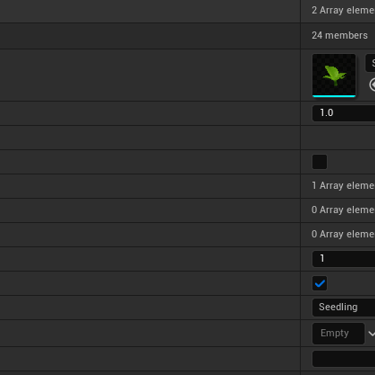
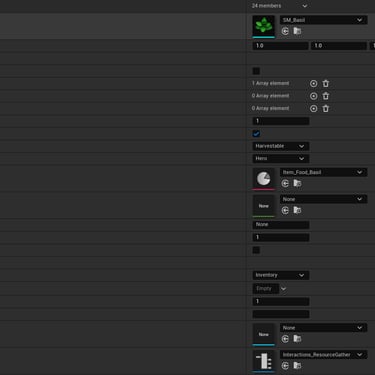
The growth phases were set up inside a data asset for the seed. This allowed up to not have to have a unique BP for each plant type. There was only one main plant BP and it could be spawned with a reference to any seed data asset. It would then pull the data from its current growth phase which would determine, among other things, the mesh it would use.

I experimented with several ways to add more VR interaction to gardening. This was a prototype for a plant type that required the player to shake the fruit loose so the hero could pick them up

This was a prototype for another plant type that required the player to pull and twist in order to harvest the fruit. This video also showcases an extension of the growth phases system that allowed the main plant and each individual fruit to grow separately

Here's a video of a later version of gardening that includes most of the same elements of the prototype but allows garden plots to be created with the hoe tool and has plants growing when progressing to the next day instead of being on a timer
Camera Work
When we switched to flat-screen we needed to do a lot of camera work. VR doesn't have any due to the camera being attached to the player's head, so we had a lot of work ahead of us. I helped set up a bunch of camera modes to better show off various parts of the game.

Camera mode I set up that allowed the camera to keep 2 or more characters in frame and in focus at the same time

Dialogue cam

Crafting cam

Cinematic cam
And More!

Early Crafting system prototype

Later crafting iteration that added a VR interaction to add ingredients

Buying and Selling in 3D

System for rotating shop inventory

Shop after I changed it to work with my 2D cursor

Prototype for catching bugs and turning them into pets
Global Conditions
Early in the project we identified a few different systems that were built separately but were essentially doing the same thing: trying to check specific conditions about the state of the game. I gathered these systems, along with a lot of input from various designers and put them together into a single Global Conditions system.
The goals of this system were these:
Allow game stat to be queried from anywhere including BPs, Dialogue Trees, Loot Tables, and the Resource Spawning System. This would allow each of these systems to show dialogue, spawn items or resources, or anything else based on the queried conditions
Allow designers to easily extend this system by creating new condition types in BP
Ease of Use
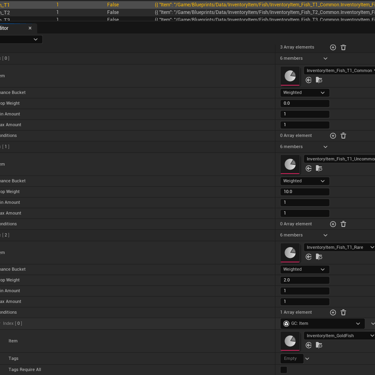
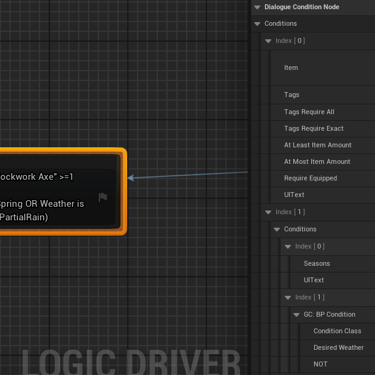
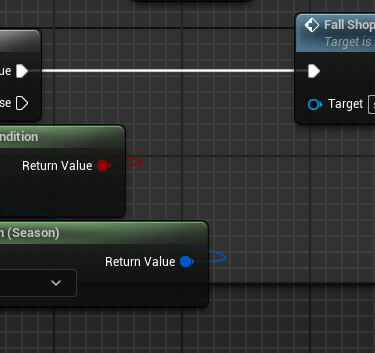
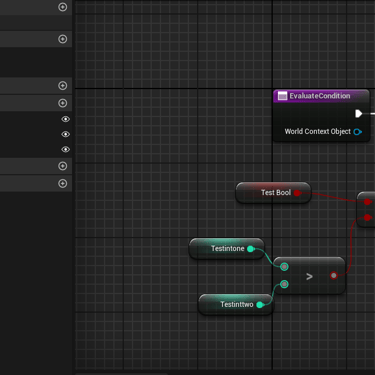
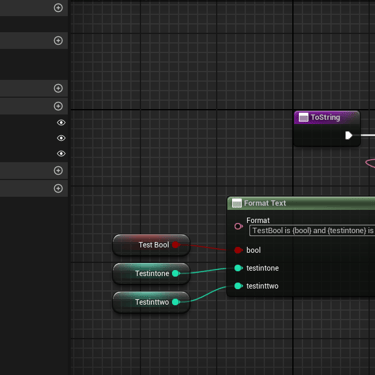
Below are images of these conditions being used in various systems within the game as well as an example I set up for how designers could set up BP Global Conditions.
One example of a system that I owned from beginning to end is the decoration mode I built for this project. It started with two prototyped versions, one that was grid based and one that was free-place. After testing we decided that the grid-based version would be easier to use effectively with VR controls. This system went through lots of iterations as I first built it for VR controller input, then changed it to work with hand tracking input (when our contract partner insisted that we focus primarily on hand tracking), and finally switched it all over to work with gamepad inputs when we made a push to get a flatscreen demo we could use to try to secure funding for the project.
Below are clips of this system at various stages of development.
Contact
twokingsofold@gmail.com
© 2026. All rights reserved.